Let’s Talk About CRMs
This page may contain links to Amazon.com or other sites from which I may receive commission on purchases you make after clicking on such links. Read my full Disclosure Policy

Students often ask me what CRM (client relationship management) application I recommend for a professional organizing business and do they need one. Let’s talk about CRMs.
When I started my organizing business in 2003, the CRMs available were geared for medium size businesses or larger ones. If the CRMs available today that focus on single-owner businesses or businesses with a few employees were available in 2003, I would have set my business up on one.
Instead, I mostly automated my business workflow without a CRM using the following applications:
- Website (client intake and engagement)
- Mailchimp (build a leads/client list and stay in touch)
- Acuity Scheduling (schedule client sessions)
- Square (invoice and collect payments)
- Quickbooks (client database and business accounting)
- Zoom (client assessment and virtual sessions)
- Google (email and client information sharing–Docs, Sheets, Forms)
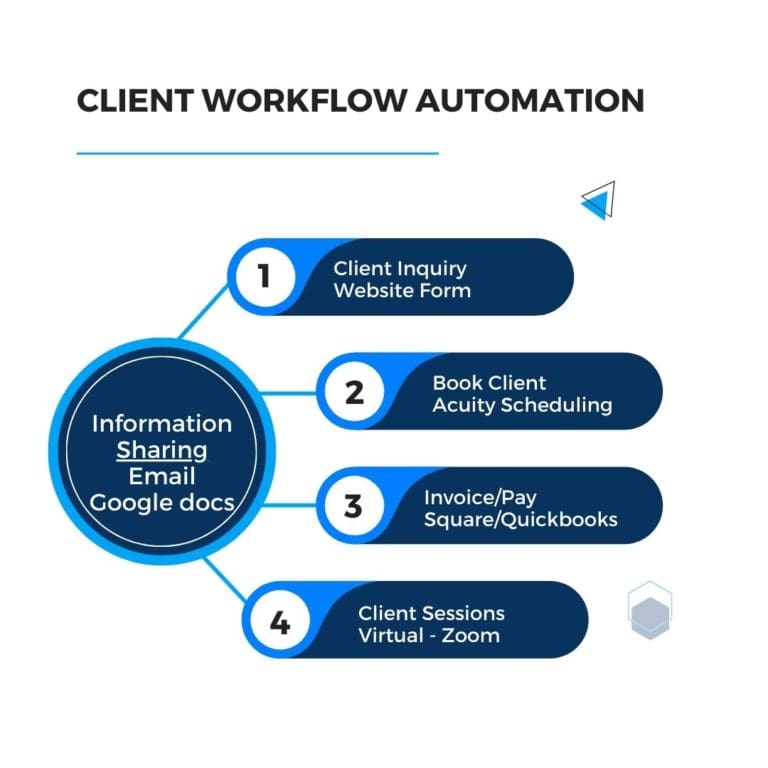
How I have automated my client process without a CRM:
Client Inquiry
I receive 99% of my leads/inquiries on my website, where a viewer is easily directed to my Get Started page, which begins the client intake process where they:
- Are prompted to select a date and time for a 15-minute discovery call (Acuity Scheduling integrated with Zoom)
- Read and sign my client agreement (a form created in Acuity Scheduling with embedded code on the Get Started page)
- Complete my needs assessment form (created in Acuity Scheduling with embedded code on the Get Started page)
- Upload project photos
- When I worked on site during the pandemic, I required proof of Covid-19 vaccination uploaded
- Schedule discovery call
Client Books Session
- After the discovery call, I email the client (not automated) to schedule a session, including a link to book client project sessions (the link is generated from Acuity Scheduling)
- The client books their organizing session
- Confirmation emailed (automated email generated from Acuity Scheduling after scheduled)
- Reminders are emailed automatically from Acuity Scheduling
Client Pays Invoice
- The client pays the invoice for the session (linked with Square), which is triggered when they book their session
- I manually enter the invoice and payment in Quickbooks
Client Session
- Conducted virtually in Zoom
- Information sharing is done by email with links to Google Docs
Project Completion
I email my client after project completion (not automated), including
- a note of thanks
- request a 5-star Google review (provide link)
- link to book future projects, and
- request they complete a satisfaction survey (Google form)
I think the most significant component I am missing is the automation of tracking leads and converting them to clients.
However, Mailchimp does a good job with auto-responder emails after someone requests the free offer on my website.
So, let’s talk about CRMs, and you can decide if one is right for your business.
What is CRM?
Quite simply, CRM is Client Relationship Management. From Wikipedia, Customer relationship management (CRM) is a process in which a business or other organization administers its interactions with customers, typically using data analysis to study large amounts of information.[1]
Why do you need a CRM?
A CRM gathers customer interactions across all channels in one place. Managing centralized data helps your business improve customer experience, satisfaction, retention, and service.
Having your client information in one place improves workflow seamlessly, and task automation eliminates repetitive work. Let’s look at how your workflow could flow in a CRM:
Client inquiry (website contact us page, a form created in CRM templates). The client information is captured from the contact us page and stored in the CRM, which can be populated into scheduling, form templates, and invoicing.
- The client books a discovery call (integrated with an online scheduling tool or part of the CRM app)
- An email is sent to the client to complete a needs assessment questionnaire-an online form created in CRM templates (automated in CRM)
- An email is sent to the client after the discovery call to schedule a session (automated in CRM to be sent X minutes after the discovery call)
- An email is sent to the client confirming the project session (automated in CRM to be sent after booking)
- An email is sent to the client reminding them of the project session date/time (automated in CRM to be sent X hours in advance of the session)
- Invoice client (automated in CRM to be sent after booking or after completion of session)
- A thank you email is sent to the client after project completion (automated in CRM to be sent after the final session)
Other Features and Benefits of a CRM
Integration
CRMs can integrate with other applications such as Quickbooks, Zoom, Zapier, Calendars, eMail, Square, Paypal, Mailchimp, etc., avoiding duplicate data entry.
Client Portal
You can exchange information with your clients in a CRM. Organize your client’s forms, emails, invoices, and tasks in one place. Clients can access their portal on your website with a password.
Custom Triggers
Customize workflow actions to be triggered by specific conditions or at certain times.
Task Reminders
Create task reminders within a workflow for you and your team to stay on track with each project.
Tags & Statuses
Use workflows to tag projects and change statuses for quick and easy organizing.
Autopay
Set up recurring invoices that automatically collect payments. For example, 50% at booking and 50% at project completion.
Client Reminders
Send automatic reminders to notify your clients about incomplete forms or upcoming payments.
Reusable Templates
Create templates for workflows, forms, proposal packages, canned emails, and more.
How do I find a CRM?
Google! Here are a few to start with:
Dubsado – best for small businesses and solopreneurs, attractive templates, focus on workflow automation. Their website was the easiest to navigate and locate customer support. $35-$55/month or $335-$525 per year. You will receive a discount code if you attend a short webinar; mine was 50%.35
Hubspot – best for any business. Their website is also very easy to navigate. Free products or premium products start at $20/month for 1,000 contacts.
Jobber – best for scheduling and dispatching teams, time tracking, and expense tracking. $49-$149/month
Honeybook – best for small businesses and solopreneurs. $29 – $109/month
SMMware – professional organizing and move management industry specific. Their website feels a bit clunky to navigate. Starts at $30/month.
How do I choose a CRM?
Price
The price of CRM software can vary widely based on the number of users, the extent of the software’s functionality, and the company’s specific needs. And ask for a discount code! Many CRMs offer trial software periods to let you try out their CRM features and functionalities.
Easy to set up and use
Many CRMs put a strong emphasis on ease of use. Find a tool with good data visualization that provides streamlined apps.
Customer service
Look for a customer support team in your business’s time zone with good support and a large user community to quickly resolve setup difficulties.
The Bottom Line
CRMs are about increasing sales, saving you time and money, and giving customers a seamless process for interacting with your business. Only you can decide if one is suitable for your business or not.
Want to ask your colleagues about which CRM or other software they recommend?
Join the POPS Circle, where organizing and productivity professionals share ideas, resources, and support.
Photo by denisismagilov / DepositPhotos


8 Comments
Leave a Comment
The Productivity & Organizing Peer Support (POPS) Circle is a virtual community where organizing, productivity, and related professionals build genuine relationships, exchange ideas, and support one another’s growth.
Your first two meetings are free!
Thank you so much for creating lovely communities and introducing me to new people from all over the world.
Pam Holland, Mindful Decluttering and Organizing, LLC
Great information about CRMs. I used to use them a lot when working in the consulting business. It is nice to see what has changed since then, all those years ago. Thanks for the update.
They’re pretty amazing, aren’t they? In my second-to-last job, I had the opportunity to learn and use ACT! which was so powerful. Once I had my business, I helped a few clients get started with it. But by the time I was ready to buy it myself, it had completely changed. I downloaded a free trial, it worked, then it stopped working, but they wouldn’t give me tech support unless I bought it. I just didn’t feel like devoting any more time to it, and ended up creating my own system, similar to what Anne did. Quite a few CRMs have caught my eye since then, but what I do works well enough that it’s not worth taking the time to research, transition, and learn a new system.
This is a common topic on NAPO’s POINT. Which one is best? Which is worth the money? Should I use the paid or free version?
I set up my system “manually” when I got started because I’d never heard of a CRM. It’s a bit clunkier than having everything automated and connected, but its only me, and I’m comfortable with it, so I haven’t switched over.
Were I to start over again, I would use a CRM to coordinate everything.
It sounds like that’s the case for many of us!
In an ideal world, you’d invest in a CRM in the early days, so it can grow with you. Unfortunately, when you’re just starting out, there’s not always funds available for anything beyond the core essentials. And by the time you really need it, it would be a lot of work to move all your information into it, not to mention the learning curve. It would be great if someone would offer it free for a whole year. During that time you could get everything set up and start generating income, so by the time the year is over, you’d be happy to start paying!
After reading Anne’s piece and the comments, I also agree that setting up a CRM at this point in my business (33+ years) wouldn’t make much sense. But it would have been great to do early on.
Like Anne, I’ve created my own way of handling business details. And while the systems have worked, I have also morphed them over the years to improve them. They were mostly analog at the start, and now I’ve shifted some of the processes to be more automated, such as scheduling.
With that said, having a system that lets you manage everything from one place seems awesome.
Doesn’t it though?
The beauty of creating your own system is that it’s probably easier to tweak your processes as needed. I say “probably” because I’m sure some CRMs are more flexible than others.
When I started my business 25 years ago, I put many of these various modules in place in a DIY fashion. I had no automation. My newsletter was paper, addressed with Word’s mail-merge function, and mailed in a stamped envelope. I scheduled every call myself (via email or phone), and did a verbal needs assessment. I got paid in-person at the end of each session. Over the years I’ve added (and subtracted) a variety of technology pieces, but overall, my methods are still very DIY and free. It feels personal rather than laborious.
That said, if I started a business today, I’d absolutely want all of the features, and I’d be looking at something like Dubsado or Honeybook, and I can’t believe I hadn’t heard of SMMWare, considering it was created for our profession. I don’t have another 25 (maybe 15? 10?) years left in my business, so I’m not sure I’ll be investing in CRMs, but I wish someone had provided such a clear explanation back near the turn of the century.
Janet, thanks for sharing Anne’s post.
It sounds like many of us are in the same boat. I’d love to hear from some people who’ve been in business for under 10 years and find out what they are doing!