
I Couldn’t Run My Business Without Todoist
This page may contain links to Amazon.com or other sites from which I may receive commission on purchases you make after clicking on such links. Read my full Disclosure Policy
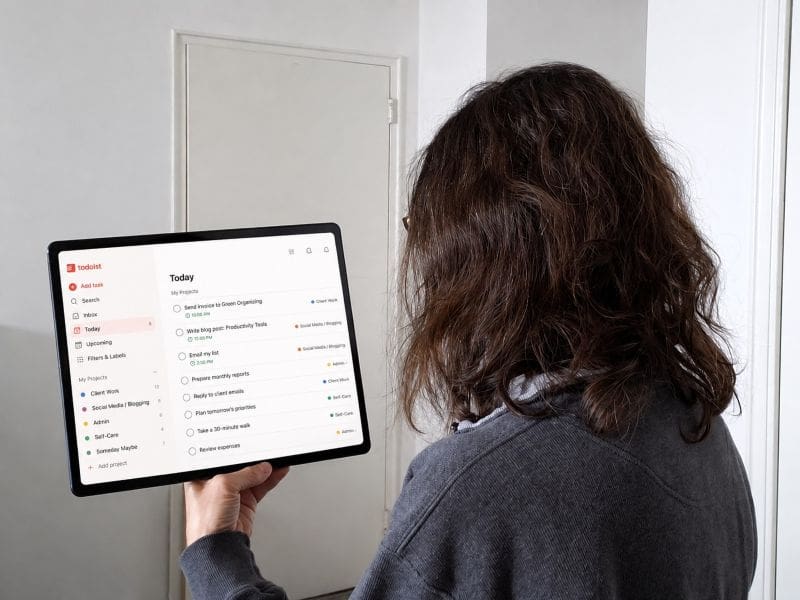
When you run a small business, you need a good system for managing your workload.
I tried several different apps, but the one that worked best for me eventually became cumbersome.That’s when I discovered Todoist, which I’ve been using for nearly 10 years. Here’s what I love about it.
Projects and Tasks
Every task is assigned to a project. This feature is great for actual projects that consist of multiple tasks that won’t all be completed at one time. But it also works for just grouping similar tasks together, such as Client Work, Social Media / Blogging, Admin, and Self-Care.
You can even put the projects in whatever order you choose, so the most important ones come up at the top of your screen.
Templates
Todoist offers a wide range of templates covering everything from grocery lists to launching a product, as well as popular productivity methods such as The Pomodoro Technique, Time Blocking, Getting Things Done, and more.
These hadn’t been introduced when I started using Todoist so I haven’t made extensive use of them, but they look like a great way to get off the ground quickly.
The Blog Post template looks especially useful, guiding you through a similar process to what I outlined in How to Save Time Blogging.
Of course, the templates can all be customized however you like!
And if your projects usually consist of the same tasks, you can even create your own templates so you don’t have to start from scratch every time.
Priorities
Each task can be assigned a red, orange, blue, or white flag. Todoist suggests using it like the Eisenhower Matrix:
- Red: Urgent & Important
- Orange: Important & Not urgent
- Blue: Urgent & Unimportant
- White: Unimportant & Not urgent
My system is similar, but I think of it as:
- Red: Do today
- Orange: Do this week
- Blue: Do this week if I can
- White: Do whenever
I rarely use the white flag for current tasks. Instead, I assign “someday maybe” tasks to their own projects, with the white flag and no due dates. When I have time, I can easily choose one based on my current objectives and time available.
Recurring Tasks
This feature is priceless! I can’t think of a better way to keep track of all those things that just keep coming up, like sending out invoices, emailing my list, or completing yearly reviews for my clients. It’s also excellent for forming new habits, like daily walks.
Due Dates, Deadlines and Reminders
Setting due dates is intuitive. I can use the calendar widget to select a date, choose Tomorrow, Later this week, This weekend, or Next week, or type a phrase like “1st wed in dec”.
I set the due date as the date when I plan to complete the task (though sometimes I have to carry over to another day). I can enter a different date as a deadline, so I don’t have to worry about missing any tasks that are time-sensitive.
For recurring tasks, I can simply type “every 3 weeks starting tomorrow” and it figures it all out.
If something needs to be done even before I start my workday, I set a reminder for 5:00 AM so it’s the first thing I see when I pick up my phone. I rarely need reminders for anything else, but it’s good to know I have the option.
Synchronization
I use the web-based version while I’m working on my laptop, but with apps for my phone and tablet, I can easily take a quick look at what’s coming up, or add ideas that pop into my head when I’m not at my desk.
Integrations and New Features
They’re continually adding more features and integrations with other apps, including ChatGPT.
I haven’t checked all of them out, but I encourage you to explore all of Todoist’s features to see what it can do for you.
Summary
Todoist is so flexible that I’m sure you can adapt it to your (or your client’s) needs and workstyle.
I started with the free plan, but upgraded to the Pro Plan when I wanted to create more projects and access additional features. Visit their website for current Todoist pricing.
Using Todoist is so natural for me now that I probably forgot to mention something, so if you have questions, please ask!
Explore More Organizing Tools
There are so many organizing products out there that it’s not always easy to choose the right one.
My Organizing Tools & Resources Guide includes recommendations for planners, organizing products, and digital tools to help you and your clients keep things organized.




6 Comments
Leave a Comment
The Productivity & Organizing Peer Support (POPS) Circle is a virtual community where organizing, productivity, and related professionals build genuine relationships, exchange ideas, and support one another’s growth.
Your first two meetings are free!
Thank you so much for creating lovely communities and introducing me to new people from all over the world.
Pam Holland, Mindful Decluttering and Organizing, LLC
Great that Todoist is working so well for you. I especially like how you adapted the Eisenhower Matrix. “Do today. Do this week. Do this week if I can. Do whenever.” strikes me as much easier to determine than “Is this important? Is it urgent?” (Would I have it on a list if it wasn’t important?) I use something similar in Apple’s Reminders app: This Week. Next Week. Soon/Later. Whatever helps one manage one’s many projects and tasks, right?
That’s right – and I’ve seen how well your system works for you!
Todoist is always one of the apps I recommend to people looking for a digital planning tool. I know many people love it, and its nice to see about some of the new features they are developing.
I actually didn’t realize it had a version you can use on your desktop. That is a nice feature because I don’t like always having to look at my (tiny) phone screen! Thanks for sharing about your positive experience with this tool. I think finding a tool that meets your individual needs, and one that you will use and trust, is critical for productivity.
Absolutely! If a productivity app is hindering you, it’s not the one for you – or you need help getting it to mesh with your workstyle.
No matter how many digital task apps I’ve tried over the years, researching them for my blog and for my clients, I’ve never found any that call my name. I guess I’ll always be a “Paper Doll.” That said, it’s been a LONG time since I looked at Todoist, and you’ve made it seem very enticing, especially how you’ve applied the Eisenhower Decision Matrix to its use. I’m definitely going to give it another look, and perhaps this time, embrace it more fully.
As always, I appreciate you sharing how you make tools work for you, Janet!
Thank you kindly, Julie! If you give Todoist another try, I’d love to know what you think of it now.